
How to Use Google Search Console for Technical SEO
By Daclaud Lee – SEO / AEO Consultant
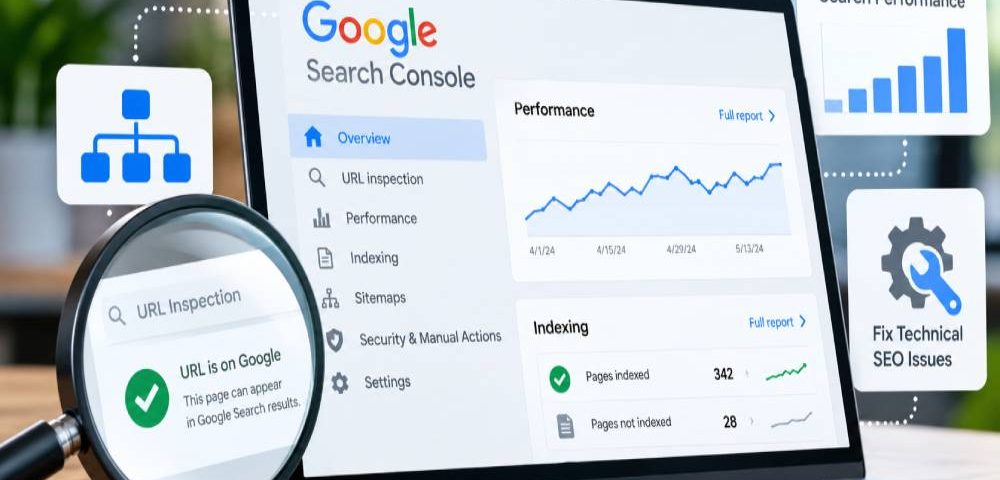
Google Search Console gives you a direct look at how Google discovers, crawls, indexes, and understands your website. By using real data from Google rather than relying on guesswork, you can identify indexing problems, crawl issues, Core Web Vitals concerns, and other technical problems that may be limiting your visibility in search results. In this guide, we’ll show you how we use Google Search Console for technical SEO to find problems, verify fixes, and help keep websites healthy and accessible to search engines.
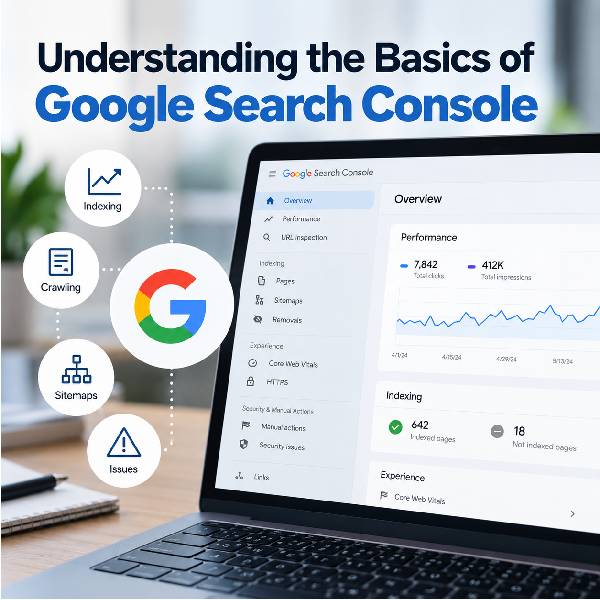
Understanding the Basics of Google Search Console
At Archmore Business Web, we use Google Search Console as one of our primary tools for monitoring how Google interacts with the websites we manage. Unlike third-party SEO platforms that estimate search performance, Search Console provides information directly from Google about indexing, search visibility, crawling, and technical issues. It allows us to see whether important pages are actually appearing in Google’s index and identify problems that could prevent a page from competing in organic search.
One of the most important things we use Google Search Console for is monitoring indexed and de-indexed pages. Even a page that has been indexed and ranking for months can eventually disappear from Google’s index, and these changes can sometimes slip through the cracks if nobody is actively checking. We routinely review indexing reports and inspect important URLs to make sure the pages we expect Google to have indexed are still there; when something disappears, we can investigate whether the cause involves crawling, redirects, canonicalization, noindex directives, server errors, or simply Google’s decision not to keep the URL indexed.
This is also why we don’t treat technical SEO as something that is finished once a website launches. In our experience managing websites and SEO campaigns, sites continually change; pages are edited, plugins are updated, redirects are created, content is added, and Google recrawls and reevaluates URLs over time. Google Search Console gives us a practical way to catch those changes, investigate unexpected indexing problems, submit important URLs for re-crawling when appropriate, and verify that Google can continue accessing the pages we’re actively trying to rank.
Google Search Console Terminology
- Property — The website or section of a website that has been added to Google Search Console for monitoring.
- Domain Property — A Search Console property that includes all versions of a domain, including HTTP, HTTPS, www, non-www, and subdomains.
- URL Inspection — A tool that lets you check a specific URL to see whether Google has indexed it and identify potential crawling or indexing issues.
- Indexed Page — A page Google has processed and added to its search index, making it eligible to appear in Google Search results.
- De-indexed Page — A page that was previously indexed but is no longer included in Google’s index.
- Crawling — The process Google uses to discover and access pages and other resources on a website.
- Googlebot — Google’s web crawler, which visits websites and gathers information Google can use for indexing.
- Sitemap — A file, usually an XML sitemap, that provides Google with a list of URLs on your website that you want search engines to discover.
- Indexing — Google’s process of analyzing a page and potentially adding it to its search index.
- Crawled – Currently Not Indexed — Google has visited the URL but currently isn’t including it in its search index.
- Discovered – Currently Not Indexed — Google knows the URL exists but has not yet crawled it.
- Noindex — A directive instructing search engines not to include a particular page in their search index.
- Core Web Vitals — Google’s metrics for evaluating aspects of real-world page experience, including loading performance, responsiveness, and visual stability.
- Impressions — The number of times a page or other search result from your website was shown in Google Search.
- Clicks — The number of times users clicked your website’s result from Google Search.
- CTR (Click-Through Rate) — The percentage of impressions that resulted in a click.
- Average Position — The average topmost position of your site’s result for the queries measured in Search Console.
- Query — A search term or phrase for which Google recorded your website appearing in search results.
- Manual Action — A penalty applied when a human reviewer at Google determines that pages on a website violate Google’s spam policies.
- Request Indexing — A feature within URL Inspection that allows you to ask Google to recrawl an individual URL. It does not guarantee indexing, but it can alert Google that a page has been added or changed.
- Canonical URL — The URL Google considers the primary version of a page when multiple URLs contain the same or substantially similar content.
- Robots.txt — A file that provides instructions to search-engine crawlers about which areas of a website they may or may not crawl.
What Are the Benefits of Google Search Console?
- Monitor Your Google Rankings — Search Console shows which search queries are generating impressions and clicks for your website, along with average search positions. This gives us actual Google data to evaluate how pages are performing in organic search.
- Find De-Indexed Pages — One of the biggest reasons we use Google Search Console at Archmore Business Web is to catch important pages that have fallen out of Google’s index. These pages can sometimes slip through the cracks without routine monitoring.
- Check Whether Pages Are Indexed — The URL Inspection tool allows us to check individual pages and determine whether Google currently has them indexed and eligible to appear in search results.
- Identify Indexing Problems — Search Console can reveal why Google isn’t indexing certain URLs, including redirects, noindex directives, duplicate/canonical issues, crawl problems, and pages Google has crawled but chosen not to index.
- Submit New and Updated Pages to Google — After publishing or substantially updating a page, we can use URL Inspection to request another crawl. This doesn’t guarantee indexing or rankings, but it can help Google discover that a URL has changed.
- Monitor Your XML Sitemap — We use Search Console to submit and monitor XML sitemaps so Google has a clear source for discovering the important URLs on a website.
- See Which Keywords Actually Generate Traffic — Rather than relying entirely on third-party keyword estimates, Search Console shows the queries for which Google actually displayed your website.
- Measure Clicks and Impressions — We can see how frequently pages appear in Google Search and how often searchers click them. This can help identify pages receiving substantial visibility but relatively few clicks.
- Find Technical SEO Problems — Search Console provides information about crawling, indexing, Core Web Vitals, HTTPS, structured data enhancements, and other technical issues that can affect how Google processes a website.
- Detect Manual Actions and Security Issues — Google can use Search Console to alert site owners to detected security problems and manual actions, making it an important website-monitoring tool in addition to an SEO platform.
- Evaluate SEO Progress Over Time — By comparing search queries, pages, clicks, impressions, and average positions across different periods, we can see how a site’s organic search visibility is changing.
- Get Information Directly From Google — Perhaps the biggest advantage is the source of the information. Search Console isn’t simply estimating what Google might be doing—it provides reporting from Google about how Google Search is interacting with and displaying your website.
How Archmore Business Web Uses Google Search Console
At Archmore Business Web, we use Google Search Console primarily as a technical SEO and indexing tool. It allows us to see how Google is discovering and processing a website, identify pages that may have slipped through the cracks, and address problems that could prevent important content from appearing in search results.
Submitting Your Sitemap to Google
One of the first things we do is submit your XML sitemap directly to Google Search Console. Google can discover a sitemap naturally, but submitting it gives Google a direct source for discovering the important URLs on your website rather than simply waiting for future crawling and discovery.
This is especially useful for new websites, redesigned websites, and sites where we’ve recently added or changed a significant amount of content.
Finding Pages That Aren’t Indexed
We regularly check Google Search Console for URLs categorized as “Discovered – currently not indexed” and “Crawled – currently not indexed.” These reports help us find pages that Google knows about but hasn’t added to its search index.
Once we identify these URLs, we investigate them individually. Rather than repeatedly requesting indexing and hoping for a different result, we look at the page itself and try to determine whether there is a technical or content-related reason it isn’t being indexed.
Reevaluating Low-Quality or Underperforming Pages
Sometimes the problem isn’t technical. A page may have weak E-E-A-T signals, thin content, substantial overlap with another page, or simply not provide enough useful information to justify maintaining it as a separate search result.
In those situations, we’ll reevaluate the content and determine what makes sense. We may rewrite and expand the page, improve its internal linking and on-page SEO, consolidate overlapping information, or strengthen its E-E-A-T signals.
Removing Pages That Don’t Need to Exist
Not every page needs to be saved. If a page isn’t generating meaningful organic search traffic, doesn’t target a useful search query, and substantially overlaps with a stronger page, we may decide that improving it isn’t the best use of resources.
Depending on the circumstances, we can remove the weaker page and 301 redirect it to the most relevant alternative or consolidate its useful content into a stronger page. Our objective isn’t simply to get as many URLs indexed as possible. We want Google indexing the pages that are actually valuable to searchers and the website.
Checking Product Snippets for E-Commerce Websites
For e-commerce websites, we also monitor Search Console’s product-related structured data reports, including Product Snippets. These reports can identify problems with the structured data Google uses to understand information such as products, prices, availability, reviews, and ratings.
When we find an issue that can and should be corrected, we’ll address it. However, not every warning in Google Search Console is detrimental, and not every warning needs to be fixed. Part of technical SEO is determining which issues actually affect the website and which can safely be left alone.
Monitoring Search Performance
We also take a look at Performance and Search Console Insights to see how the website is performing in Google Search. This includes information about search queries, impressions, clicks, click-through rates, pages, and average search positions.
We don’t rely exclusively on Search Console for analytics, however. Google Analytics is generally better suited to understanding what visitors do after reaching a website, while Search Console is particularly useful for understanding how a website is performing within Google Search itself. We use the two platforms for different purposes, with each providing a different piece of the SEO picture.
Frequently Asked Questions
Is Google Search Console Free?
Yes. Google Search Console is completely free and is provided directly by Google. Website owners, developers, and SEO professionals can use it to monitor how a website appears and performs in Google Search without paying a subscription fee.
What Is Google Search Console Used For?
Google Search Console is used to monitor and troubleshoot a website’s presence in Google Search. It can help you determine whether Google can crawl and index your pages, identify indexing problems, submit sitemaps, request re-indexing of updated pages, and review search-performance data such as impressions, clicks, search queries, and average positions.
For technical SEO, it is particularly useful because it provides information directly from Google about how Google is interacting with your website.
How Do I Know if Google Has Indexed My Page?
The best way to check a specific page is with the URL Inspection Tool in Google Search Console. Enter the complete URL, and Search Console will tell you what Google currently knows about that page and whether it is indexed. You can also use the tool to test the live URL and troubleshoot problems that may prevent Google from accessing or indexing it.
What Does "Crawled – Currently Not Indexed" Mean?
Crawled – currently not indexed means Google has already visited the URL but has not added the page to its search index at this time. This does not necessarily mean there is a technical problem with the website, and Google may reconsider the page in the future.
When an important page receives this status, we can evaluate the page’s content, internal linking, canonical configuration, accessibility, and other SEO factors to determine whether improvements should be made.
What Does "Discovered – Currently Not Indexed" Mean?
Discovered – currently not indexed means Google knows the URL exists but has not yet crawled it. Google may have discovered the URL through your sitemap, internal links, or another source but has not yet sent Googlebot to crawl the page.
For important pages, we want to make sure Google can easily discover them through proper site navigation, internal links, and an up-to-date XML sitemap.
Can I Force Google to Index a Page?
No. You cannot force Google to index a page.
You can use Search Console’s URL Inspection Tool → Request Indexing to ask Google to crawl or recrawl an individual URL. For multiple URLs, Google recommends using a sitemap. However, requesting indexing does not guarantee that Google will ultimately include the page in its index.
At Archmore Business Web, we commonly request re-indexing after making significant SEO changes to important pages so Google is made aware that updated content is available.
Does Submitting a Sitemap Help With SEO?
Submitting an XML sitemap helps Google discover and crawl the important URLs on your website, particularly when pages are new or have recently been updated. Search Console also allows us to monitor whether Google can successfully retrieve and process the submitted sitemap. Google Help
A sitemap does not directly improve rankings, nor does submitting one guarantee that every URL will be indexed. Instead, it supports technical SEO by making it easier for Google to discover the pages you want it to know about.
Why Would Google Remove a Page From Its Index?
A page can disappear from Google’s index for a variety of reasons. The page may have been deleted or redirected, received a noindex directive, become inaccessible to Google, been identified as a duplicate of another URL, or otherwise no longer be considered appropriate for indexing. In more serious cases, pages or websites can also be removed because of spam-policy violations, legal requirements, or manual actions. Google Help
This is why we periodically use Google Search Console as part of our technical SEO monitoring. If an important service or landing page unexpectedly drops out of Google’s index, Search Console can help us investigate what Google is seeing and determine whether corrective action is necessary.
What Is an XML Sitemap and Why Is It Important?
An XML sitemap provides Google with a list of URLs you want it to know about. Search Console’s Sitemaps report allows website owners to submit a sitemap and monitor whether Google can successfully read it. For larger groups of new or updated pages, Google specifically recommends using a sitemap rather than manually requesting indexing for every individual URL.
Does Submitting a Sitemap Guarantee That Every Page Will Be Indexed?
No. A sitemap helps Google discover URLs, but it does not force Google to index them. Some URLs may appropriately remain unindexed because they’re duplicates, redirects, blocked pages, or pages Google otherwise determines should not be included in its index.
Why Would Google Not Index an Important Page?
There are numerous possibilities. The page could contain a noindex directive, be blocked from crawling, redirect elsewhere, be considered a duplicate of another URL, have a canonical pointing somewhere else, be inaccessible to Google, or simply not have been crawled yet. URL Inspection is usually the best starting point for diagnosing a specific page.
What Is a Canonical URL?
A canonical URL is the URL Google considers the primary version when multiple URLs contain the same or substantially similar content. Search Console’s URL Inspection Tool can show the canonical URL declared by the website as well as the canonical Google selected. If Google considers another URL the canonical version, the inspected duplicate generally won’t be separately indexed.
Can Google Search Console Find 404 Errors?
Yes. The Page Indexing report can identify URLs Google encountered that return a 404 response. However, not every 404 needs to be fixed. Google’s guidance specifically recommends concentrating on 404 URLs that your website links to internally or that remain included in your sitemap.
Should Every Page on My Website Be Indexed?
No. This is another area where I’d make sure your current article is accurate. Google explicitly says that website owners shouldn’t expect every URL to be indexed. Duplicate pages, filter URLs, redirects, utility pages, and intentionally excluded pages may appropriately remain outside Google’s index. The priority is making sure your important SEO and service pages are indexed.
About the Author
Daclaud Lee is a digital marketing professional, author, and business consultant who has worked in SEO since 2010. A graduate of Franklin University’s Digital Marketing program, he has spent more than 15 years helping businesses improve their online visibility through search engine optimization, website development, content strategy, and digital marketing.
Through his work as a SEO consultant, Daclaud combines hands-on SEO experience with a practical understanding of how businesses use their websites to attract customers and generate leads. He also writes on topics related to SEO, digital marketing, business, and technology.
More From the Blog
Want to learn more about SEO, website optimization, and digital marketing? Explore more articles from the Archmore Business Web Blog for practical tips, strategies, and insights you can use to improve your website and online visibility.
Continue exploring the Digital Marketing Journal and discover more ways to grow your online presence with Archmore Business Web.

What is Position 0?
Ranking on the first page of Google is no longer the only goal. Many searches are answered before users even click a website, thanks to Position 0, also known as a Featured Snippet. Earning this coveted placement can dramatically increase your visibility, establish your business as an authority, and drive more qualified traffic, even above the #1 organic search result.

How to Track SERP Position
Tracking your SERP (Search Engine Results Page) positions is one of the most important parts of any SEO strategy. By monitoring keyword rankings, businesses can measure the effectiveness of their SEO efforts, identify new opportunities, and spot ranking declines before they impact traffic and leads. Whether you’re managing a local business website or a national SEO campaign, knowing where your pages rank can help you make smarter marketing decisions.

EEAT SEO Explained: Experience, Expertise, Authority & Trust
Google has become increasingly focused on content quality, credibility, and trust. That’s where E-E-A-T comes in, a framework Google uses to evaluate the Experience, Expertise, Authoritativeness, and Trustworthiness of content and the people behind it.

Free Veteran Owned Logo
Free Veteran Owned Logo Show your service with pride and let customers know who they’re supporting. This free Veteran Owned logo is perfect for your website, social media, vehicles, and printed marketing materials. Just right click on the image and “Save As”. This is royalty free, so you can use it anywhere, and make your business stand out with a badge that builds trust instantly. Use This Logo to Represent Your Service and Your Business This free Veteran Owned logo can be used across any type of business to proudly showcase that you served your country. Whether you’re running a local service company, an online store, or a professional practice, adding this badge to your website, social media, vehicles, and

How to Get Your Business Cited by AI Using High-Authority Platforms
If you’re trying to rank in AI search results, your website alone isn’t enough anymore. The platforms AI trusts most are places like Reddit, YouTube, LinkedIn, and Yelp, where real content and engagement happen daily. If your business isn’t showing up on these sites, you’re missing a major piece of the visibility game.

How to Use ChatGPT as Your Feng Shui Business Consultant
What if you could turn AI into your personal Feng Shui consultant for business? Instead of guessing layouts, colors, and flow, you can use ChatGPT to apply structured design principles with precision. Here’s how to use ChatGPT to optimize your space, brand, and environment for alignment and results.
